Put your business data where your team needs it.

Prepare customer information, reporting files, or recurring exports, deliver them between systems, and keep a record of each run.

Examples of workflows you can build

Give account managers purchase context

When purchase details live outside the CRM, prepare customer order summaries from your database, such as MongoDB, and write them to mapped HubSpot properties. Account managers can review that context alongside the customer record.

Bring separate records into one report

Join customer and order records from a database or CSV files in GitHub into a JSON reporting file in S3-compatible storage. The synthetic walkthrough below uses PostgreSQL and shows the prepared file and its run record.

Send a partner their recurring export

Read order records from an HTTP API’s JSON response, prepare them, and deliver a scheduled CSV export to the agreed FTP path, ready for the partner’s next import.

Prepare period records for finance review

Select ledger rows from Snowflake for an accounting period and export a CSV file to S3-compatible storage for reconciliation and later review.

From separate records to a reporting file.

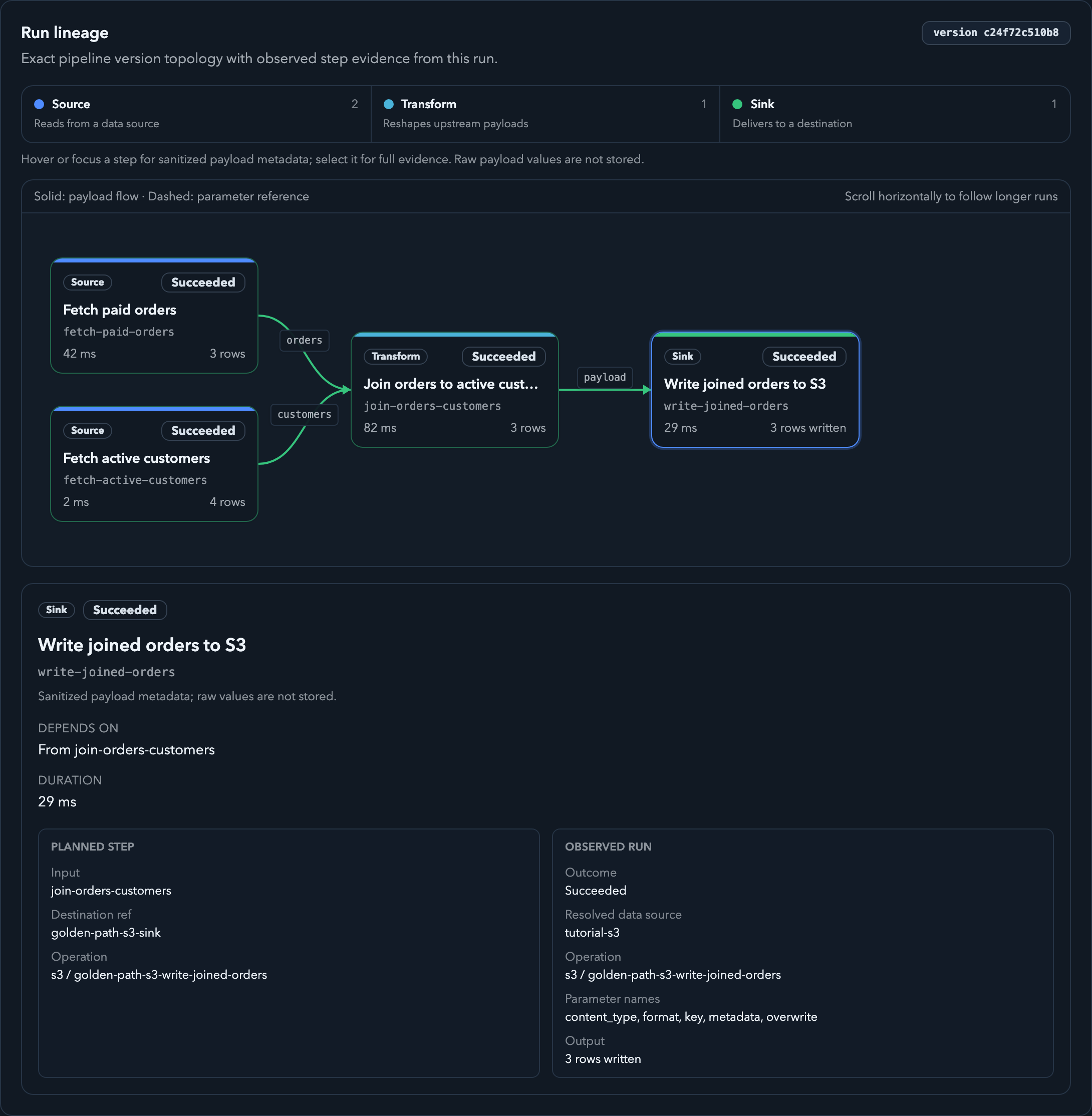
In this synthetic example, customer details and paid orders need to be brought together for reporting. Braidplane collects both, matches orders to customers, and delivers a prepared file.

A real product view using synthetic data. The run inspection shows the completed steps and delivery evidence. The result is a JSON reporting file in S3-compatible storage; the developer walkthrough below verifies its contents. Open full-size screenshot.
Braidplane run inspection showing the synthetic joined-orders step graph and selected S3 write evidence.

Set up the workflow, then follow each run

Setup needs someone who understands your systems and data. Configure connections and permissions, prepare the records with SQL, and review the workflow definition in Git. Then deploy a version and run it manually or on a schedule.

Review changes before use

Keep a record of workflow changes so your team can review them before deployment.

Check expected data

Define the fields and types you expect. Braidplane checks them where your workflow declares those expectations.

Let Braidplane run it

Start a workflow manually or configure a schedule. Braidplane manages execution and keeps a run record.

Find the failed step

See which steps completed or failed and inspect the available diagnostics to investigate.

Your workflow, end to endCollect → Prepare → Deliver
Collect
Collect information

Read the customer records, orders, or other information your workflow needs.

Walkthrough

Collect customer details and paid orders.

information
Prepare
Prepare it

Combine related records and select the information you need.

Walkthrough

Match each order with its customer.

prepared result
Deliver
Deliver it

Send the prepared information to another system or file.

Walkthrough

Deliver a prepared reporting file.

The reporting example uses synthetic customers and orders. Each workflow depends on the connections and operations it needs.
Technical detail and developer walkthrough

Technical detail

Workflows are pipelines with source, transform, and sink steps. Git holds the reviewable definition; SQL prepares data, and explicit input and output contracts check declared fields and types between steps. Configuration requires knowledge of your systems and data.

Developer walkthrough

Recorded CLI walkthrough

Validate, run, and verify the synthetic PostgreSQL-to-S3 reporting workflow in 30 seconds.

Synthetic workflow recording 00:00
One pipeline.
The complete run.
Loading recorded CLI walkthrough...
00:00
Loading local .cast

See how the pipeline is defined.

Two source reads, one SQL join, and one JSON write, with explicit data checks between steps.

  • SourceRead orders and customers from the selected connections.
  • TransformNative SQL maps the two row sets into joined order records.
  • SinkWrite joined orders to a JSON file in the destination.
Open the pipeline spec
metadata:   slug: golden-path-joined-orders  name: Golden Path Joined Orderssteps:   - kind: query    slug: fetch-paid-orders    name: Fetch paid orders    query:       data_source_ref: golden-path-orders-postgres      operation_type: sql      operation_ref: golden-path-orders      output_contract:         name: golden-path-paid-orders        representation: rows        fields:           - name: order_id            type: string            required: true          - name: customer_slug            type: string            required: true          - name: order_total_cents            type: integer            required: true          - name: discount_cents            type: integer            required: true          - name: net_total_cents            type: integer            required: true          - name: placed_at_utc            type: string            required: true  - kind: query    slug: fetch-active-customers    name: Fetch active customers    query:       data_source_ref: golden-path-customers-postgres      operation_type: sql      operation_ref: golden-path-customers      output_contract:         name: golden-path-active-customers        representation: rows        fields:           - name: customer_slug            type: string            required: true          - name: customer_name            type: string            required: true          - name: customer_segment            type: string            required: true          - name: region            type: string            required: true  - kind: transform    slug: join-orders-customers    name: Join orders to active customers    transform:       inputs:         orders: fetch-paid-orders        customers: fetch-active-customers      input_contract:         name: golden-path-join-inputs        representation: rows        fields:           - name: orders.order_id            type: string            required: true          - name: orders.customer_slug            type: string            required: true          - name: orders.order_total_cents            type: integer            required: true          - name: orders.discount_cents            type: integer            required: true          - name: orders.net_total_cents            type: integer            required: true          - name: orders.placed_at_utc            type: string            required: true          - name: customers.customer_slug            type: string            required: true          - name: customers.customer_name            type: string            required: true          - name: customers.customer_segment            type: string            required: true          - name: customers.region            type: string            required: true      sql: |        SELECT          orders.order_id AS order_id,          orders.customer_slug AS customer_slug,          customers.customer_name AS customer_name,          customers.customer_segment AS customer_segment,          customers.region AS region,          orders.order_total_cents AS order_total_cents,          orders.discount_cents AS discount_cents,          orders.net_total_cents AS net_total_cents,          CAST(orders.net_total_cents AS DOUBLE) / 100 AS net_total_amount,          orders.placed_at_utc AS placed_at_utc        FROM orders        JOIN customers ON customers.customer_slug = orders.customer_slug        ORDER BY placed_at_utc, order_id      output_kind: rows      output_contract:         name: golden-path-joined-orders        representation: rows        fields:           - name: order_id            type: string            required: true          - name: customer_slug            type: string            required: true          - name: customer_name            type: string            required: true          - name: customer_segment            type: string            required: true          - name: region            type: string            required: true          - name: order_total_cents            type: integer            required: true          - name: discount_cents            type: integer            required: true          - name: net_total_cents            type: integer            required: true          - name: net_total_amount            type: number            required: true          - name: placed_at_utc            type: string            required: true  - kind: sink    slug: write-joined-orders    name: Write joined orders to S3    sink:       idempotency_class: naturally_idempotent      input: join-orders-customers      input_contract:         name: golden-path-joined-orders-s3-input        representation: rows        fields:           - name: order_id            type: string            required: true          - name: customer_slug            type: string            required: true          - name: customer_name            type: string            required: true          - name: customer_segment            type: string            required: true          - name: region            type: string            required: true          - name: order_total_cents            type: integer            required: true          - name: discount_cents            type: integer            required: true          - name: net_total_cents            type: integer            required: true          - name: net_total_amount            type: number            required: true          - name: placed_at_utc            type: string            required: true      data_source_ref: golden-path-s3-sink      operation_type: s3      operation_ref: golden-path-s3-write-joined-orders      config:         key: runs/{{runtime.sink_replay_identity}}/joined-orders.json        format: json        content_type: application/json        metadata:           source: braidplane-golden-path          run: "{{runtime.run_slug}}"        overwrite: true
Data source refs Portable logical source and sink references keep credentials out of the spec.
Operation refs Source and sink steps call saved connector operations by slug.
Transform contracts Input and output contracts make each data edge explicit.
Run slug Run-scoped output keys keep artifacts tied to execution evidence.
The recording above and this spec describe the same joined-orders pipeline.

Connect the systems your workflow needs.

Connect databases, warehouses, APIs, and storage in the same workflow.

Frequently asked questions

What can I try in Alpha, and what does it cost?

Alpha evaluation is free and requires no card. Use test data and non-production systems to check a workflow, its output, and a failure case. Alpha is not production access.

What happens when I request a free call?

The link opens an email request. Tell us which systems are involved and what you need to move; we reply to arrange a time. There is no booking step or account created by the request.

Why use Braidplane if Codex, Claude, or another AI agent can build the workflow?

An agent can write a workflow, and a small one-off script may be enough. Braidplane is useful when your team needs to run that workflow repeatedly and maintain it.

  • Security. Manage access through organization permissions and encrypted stored credentials. Keep secrets out of workflow definitions.
  • Consistency. Review changes in Git, deploy a specific workflow version, and check declared data contracts between steps.
  • Observability. Inspect run history, step status, and available diagnostics to see where to investigate.
  • Managing many flows. Keep pipelines, deployments, and runs organized by project and environment as the number of workflows grows.
  • Less operational plumbing. Reuse connector operations, scheduling, and run inspection across workflows instead of maintaining those pieces for each script.

An agent can build these controls into a custom solution too. Braidplane gives your team a shared platform to operate them. You still need to review the workflow and the access you grant.

Dagster and Prefect already support Git workflows. Why choose Braidplane?

Git-based workflows are not unique to Braidplane. Dagster also offers YAML components and data checks; Prefect supports flow code stored in Git. Those features alone are no reason to switch.

Braidplane focuses on moving business data through built-in connector operations and SQL transforms. A pipeline definition describes what to collect, how to prepare it, and where to deliver it. Connections are selected for each environment, deployment selects a specific version, and the product records its runs.

Consider Braidplane if that workflow model fits your job and you want to configure and operate it in one product. This is a choice about product fit, not a claim that Dagster or Prefect cannot do the same job. Try a real workflow and a failure case with the available Alpha connectors. If your existing tool works well, keep it.

How do you handle conflicts in a Git-based workflow?

Resolve conflicting file edits in Git through your usual review and merge process. Braidplane does not resolve those edits for you.

Before importing changes, Braidplane shows you a preview. If someone updates the workflow in Git before you apply it, Braidplane asks you to preview again so you can review the latest changes.

Importing changes does not deploy them automatically. You choose a persisted workflow version and an environment to deploy. Runs use that deployed version, so a later branch change does not silently change what executes.

Can an AI agent help me build a Braidplane workflow?

Yes. An agent can help write or edit a pipeline definition in Git. Review the changes and validate the definition before deploying it. Braidplane runs supported connector operations and SQL transforms; a generated script does not automatically become an executable pipeline.

Do I need technical knowledge to set up a workflow?

Yes. The person configuring connections and workflow steps needs to understand the systems and data involved. SQL prepares data, and Git keeps the reviewable definition. Once configured, your team can follow runs and inspect results in the product.

Can Braidplane connect to my CRM or ERP?

Check the connector catalogue above. “Available in Alpha” lists current connectors; “Planned” entries are future work. Read and write operations vary by connector. If your system is missing, tell us about your workflow so we can scope the connection it needs.

What happens if a workflow fails?

The run record shows step status and available diagnostics so you can investigate the failure. After fixing the cause, check which writes already completed before starting another run. A failed run can still have delivered some data.

Tell us about your workflow

Discuss whether Braidplane fits your workflow on a free call, or explore independently with a free Alpha account.

  1. Describe the job. Tell us what needs to move, between which systems, and what is difficult today.
  2. Scope a safe example. We help map the connections, define the pipeline, and reproduce the workflow with synthetic data.
  3. Agree what success means. Decide together which result and failure checks would make the evaluation useful.